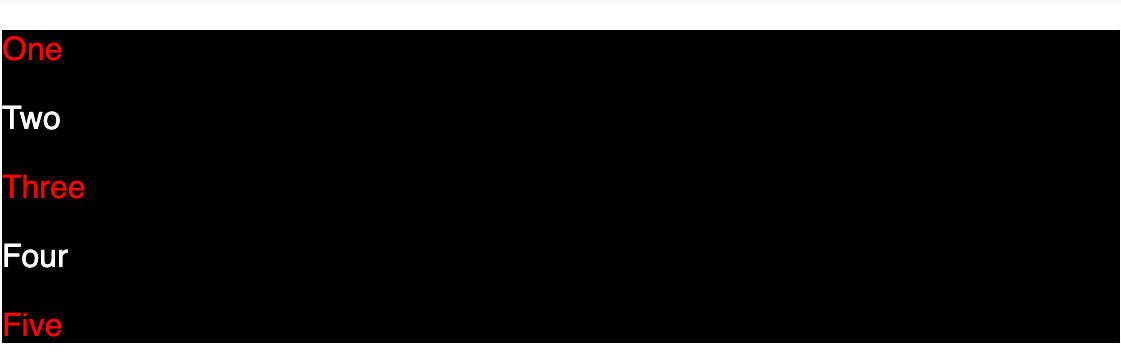


{"resource":{"author":{"id":"h2so9H8jPMmgUKGghoNl","name":"Yomesh Gupta","username":"yomeshgupta"},"content":{"link":null,"difficulty":1,"domain":2,"type":1,"isInternal":true,"body":"The `:nth-child()` CSS pseudo-class matches elements based on their position among a group of siblings i.e. let us say a div has five children where 3 are `p` tags and 2 are `span` tags. If we write the following HTML and CSS --\r\n\r\n```html\r\n<div>\r\n  <p>One</p>\r\n  <span>Two</span>\r\n  <p>Three</p>\r\n  <p>Four</p>\r\n  <span>Five</span>\r\n</div>\r\n```\r\n\r\n```css\r\ndiv {\r\n  background: black;\r\n  color: white;\r\n}\r\n\r\ndiv p:nth-child(2n+1) {\r\n  color: red;\r\n}\r\n```\r\n\r\nIt highlights `One` and `Three` only. \r\n\r\n![Output 1](https://ik.imagekit.io/devtoolstech/blog/nth-child/Screenshot_2023-02-17_at_11.55.38_PM_bguuSDkek.png?ik-sdk-version=javascript-1.4.3&updatedAt=1676659138066)\r\n\r\n## Now, why is that?\r\n\r\nFor this, you need to mainly understand the functional notation syntax of the `:nth-child` selector i.e. `:nth-child(An+B)`. Here\r\n\r\n- `A` is the step size\r\n- `B` is the offset\r\n- `n` is the non-negative integer, starting from `0`.\r\n\r\nIn our example, `:nth-child(2n+1)` where `A=2`, `B=1`, and `n can go from 0,1,2..` to `Infinity`.\r\n\r\n```\r\n:nth-child(2(0)+1) => :nth-child(0 + 1) => :nth-child(1)\r\n:nth-child(2(1)+1) => :nth-child(2 + 1) => :nth-child(3)\r\n:nth-child(2(2)+1) => :nth-child(4 + 1) => :nth-child(5)\r\n...\r\n```\r\n\r\n## Element Indexing\r\n\r\nIn our CS classes or our dev work, we are used to having 0-based indices. However, in the case of counting the elements, 1-based indexing is used i.e.\r\n\r\n```html\r\n<div>\r\n  <p>One</p> // 1\r\n  <span>Two</span> // 2\r\n  <p>Three</p> // 3\r\n  <p>Four</p> // 4\r\n  <span>Five</span> // 5\r\n</div>\r\n```\r\n\r\n**The `n` starts from `0` but elements counting starts from `1`.** Hence, it matches element `One` and `Three`.\r\n\r\n## Why is Five not highlighted in red?\r\n\r\nFor `:nth-child` selector, the child count includes children of any element type; but it is considered a match only if the element at that child position is of the specified element type. Hence, even though `:nth-child(2n+1)` produces `5` when `n=2` and we have a fifth element, it is highlighted because it is of type `span`. Our condition to match the element must be at the right position and right type.\r\n\r\nIf we change the fifth element to type `p` then it would be highlighted.\r\n\r\n```html\r\n<div>\r\n  <p>One</p> // 1\r\n  <span>Two</span> // 2\r\n  <p>Three</p> // 3\r\n  <p>Four</p> // 4\r\n  <p>Five</p> // 5\r\n</div>\r\n```\r\n\r\n![Output 2](https://ik.imagekit.io/devtoolstech/blog/nth-child/Screenshot_2023-02-17_at_11.55.52_PM_99EUwTpyA.png?ik-sdk-version=javascript-1.4.3&updatedAt=1676659220767)\r\n\r\n## Learn by examples\r\n","languages":["react"],"editorConfig":{"react":{"nodes":[{"nodeId":"4aad7d47-c5b9-4d0c-9b0c-c0a4340e87ec","nodeType":"file","nodeName":"App.js","nodeContent":"import styled from 'styled-components';\n\nconst Container = styled.div`\n  &:hover {\n    ul[data-key='${(props) => props.label}'] > ${(props) => props.label} {\n      background-color: yellow;\n    }\n\n    p {\n      display: block;\n    }\n  }\n`;\n\nconst items = [\n  {\n    id: 1,\n    label: ':first-child',\n    description: 'Highlighting the first child.',\n  },\n  {\n    id: 2,\n    label: ':last-child',\n    description: 'Highlighting the last child.',\n  },\n  {\n    id: 3,\n    label: ':nth-child(2)',\n    description: 'Highlighting the second child.',\n  },\n  {\n    id: 4,\n    label: ':nth-last-child(2)',\n    description: 'Highlighting the second child from the last.',\n  },\n  {\n    id: 5,\n    label: ':nth-child(odd)',\n    description:\n      'Highlighting the every odd child i.e. 1,3,5,7,9....and so on.',\n  },\n  {\n    id: 6,\n    label: ':nth-child(even)',\n    description:\n      'Highlighting the every odd child i.e. 2,4,6,8,10....and so on.',\n  },\n  {\n    id: 7,\n    label: ':nth-child(n+4)',\n    description:\n      'Highlighting the every child starting from 4 i.e. 4,5,6,7....and so on.',\n  },\n  {\n    id: 8,\n    label: ':nth-child(3n-1)',\n    description:\n      'Highlighting the every matching the condition i.e. (3(1) - 1) = 2, (3(2) - 1) = 5',\n  },\n  {\n    id: 9,\n    label: ':nth-child(3n+1)',\n    description:\n      'Highlighting the every matching the condition i.e. (3(0) + 1) = 1, (3(1) + 1) = 4, (3(2) + 1) = 7',\n  },\n  {\n    id: 10,\n    label: ':nth-child(4n)',\n    description:\n      'Highlighting the every matching the condition i.e. (4(1)) = 4',\n  },\n];\n\nexport default function App() {\n  return (\n    <main>\n      {items.map((item) => {\n        return (\n          <Container label={item.label} key={item.id} className=\"content\">\n            <div>\n              <span>{item.label}</span>\n              <ul data-key={item.label}>\n                <li></li>\n                <li></li>\n                <li></li>\n                <li></li>\n                <li></li>\n                <li></li>\n              </ul>\n            </div>\n            {item.description ? <p>{item.description}</p> : null}\n          </Container>\n        );\n      })}\n    </main>\n  );\n}\n","nodeLanguage":"javascript"},{"nodeId":"f7578692-c62f-4c69-8c17-4876fd36eff1","nodeType":"file","nodeName":"index.js","nodeContent":"import { StrictMode } from \"react\";\nimport ReactDOM from \"react-dom\";\n\nimport App from \"./App\";\nimport \"./style.css\"; \n\nconst rootElement = document.getElementById(\"root\");\nReactDOM.render(\n  <StrictMode>\n    <App />\n  </StrictMode>,\nrootElement\n);","nodeLanguage":"javascript"},{"nodeId":"3f480fbb-5d4a-4a3a-9e30-80af7d530e96","nodeType":"file","nodeName":"style.css","nodeContent":"* {\n  box-sizing: border-box;\n  margin: 0;\n  padding: 0;\n}\n\nbody {\n  font-family: sans-serif;\n  -webkit-font-smoothing: auto;\n  -moz-font-smoothing: auto;\n  -moz-osx-font-smoothing: grayscale;\n  font-smoothing: auto;\n  text-rendering: optimizeLegibility;\n  font-smooth: always;\n  -webkit-tap-highlight-color: transparent;\n  -webkit-touch-callout: none;\n  background: #2f3542;\n}\n\nmain {\n  width: 80%;\n  margin: 50px auto;\n  padding: 20px;\n  display: flex;\n  flex-direction: column;\n  justify-content: center;\n  align-items: center;\n  border: 1px solid #ecf0f1;\n  transition: all 0.2s ease-in-out;\n  color: white;\n}\n\n.content {\n  width: 100%;\n  padding: 10px;\n  border-radius: 4px;\n  transition: all 0.2s ease-in-out;\n  cursor: pointer;\n}\n\n.content div {\n  display: flex;\n  justify-content: space-between;\n}\n\n.content div span {\n  font-weight: 600;\n}\n\n.content p {\n  padding: 10px 0px 0px 0px;\n  color: #ebebeb;\n  font-size: 14px;\n  display: none;\n}\n\n.content ul {\n  display: flex;\n  justify-content: space-between;\n  gap: 20px;\n}\n\n.content ul li {\n  width: 20px;\n  height: 20px;\n  border-radius: 50%;\n  background-color: rgba(255, 255, 255, 0.7);\n  list-style: none;\n}\n\n.content:hover {\n  background-color: #000000;\n}\n","nodeLanguage":"css"},{"nodeId":"93f9d0ad-b85e-483e-91cb-0b8d4c8353c4","nodeType":"file","nodeName":"index.html","nodeContent":"<!DOCTYPE html>\n<html lang=\"en\">\n  <head>\n    <meta charset=\"UTF-8\">\n    <meta name=\"viewport\" content=\"width=device-width, initial-scale=1.0\">\n    <title>Document</title>\n  </head>\n  <body>\n    <div id=\"root\"></div>\n  </body>\n</html>","nodeLanguage":"html"}],"dependencies":{"react":"17.0.2","react-dom":"17.0.2","react-scripts":"4.0.0","styled-components":"5.3.6"},"openPaths":["/App.js","/index.js","/index.html","/style.css"],"entry":"App.js","activePath":"/style.css"}}},"stats":{"views":14805,"used":0,"likes":0},"description":"","published":true,"isActive":true,"tags":["javascript","frontend","code","programming","ui","ux","interactive examples","codedamn","nth-child selectors","pseudo selectors","css selectors","sass","scss","less","styling","html","css fundamentals","frontend fundamentals","examples","codesandbox"],"slug":"understanding-nth-child-selectors-in-css---rid---ZD7WRQQ8iSNv8SCSZdTG","isPremium":false,"categories":[],"requires":[],"_id":"63f077e9412456738aaee88c","title":"Understanding Nth-Child Selectors in CSS","resourceId":"ZD7WRQQ8iSNv8SCSZdTG","createdAt":1676703721912,"modifiedAt":1676704374212},"currentUser":null,"isOwner":false,"recommendations":{"questions":[{"_id":"645b815c6577005718bc9ed7","content":{"languages":["javascript","typescript"],"difficulty":1},"tags":["frontend","code","programming","lodash","polyfill","lodash once","javascript interview question","ui","ux","devtools tech","codedamn","egghead","frontend masters","problem solving","frontend interview questions","underscore","geeksforgeeks"],"slug":"implement-a-function-that-accepts-a-callback-and-restricts-its-invocation-to-at-most-once-or-lodash-polyfills-or-frontend-problem-solving---qid---RLIaoJTXeiN81W2HQYry","title":"Implement a function that accepts a callback and restricts its invocation to at most once | Lodash Polyfills | Frontend Problem Solving","questionId":"RLIaoJTXeiN81W2HQYry"},{"_id":"65ad10f98f7afe4225332ec3","content":{"languages":["react","html"],"difficulty":4},"tags":["javascript","frontend","code","ui","ux","devtools tech","frontend coding challenge","react","ui game","interview question","ms"],"slug":"build-country-capital-game-or-microsoft-frontend-interview-question-or-javascript-or-react-js---qid---yPb5g7MLCSf6j2F3qjqj","title":"Build Country Capital Game | Microsoft Frontend Interview Question | JavaScript | React.js","questionId":"yPb5g7MLCSf6j2F3qjqj"},{"_id":"625573043ecc8e41a79f0aae","content":{"languages":["javascript","typescript"],"difficulty":4},"tags":["javascript","array","shuffle","frontend","interview question","advanced javascript"],"slug":"can-you-shuffle-an-array-or-javascript-interview-question---qid---p7CFYOFSacFNW4crQnWD","title":"Can you shuffle an array? | JavaScript Interview Question","questionId":"p7CFYOFSacFNW4crQnWD"},{"_id":"5ed0f91d3d4a7a0e4cdee88b","content":{"languages":["javascript"],"difficulty":2},"tags":["javascript"],"slug":"what-will-be-the-output-for-the-following---qid---XVymBb3lyaKDuXiSK6qH","title":"What will be the output for the following?","questionId":"XVymBb3lyaKDuXiSK6qH"},{"_id":"638b6012937c6f54916609f6","content":{"languages":["react"],"difficulty":2},"tags":["javascript","react","custom hook","interview","interview questions","devtools tech","questions","previous state","componentDidMount","shouldComponentUpdate"],"slug":"how-to-create-useprevious-hook-in-react-js-or-javascript-interview-question-or-frontend-problem-solving---qid---z4HmkKVlTn12wS5tOYLq","title":"How to create usePrevious hook in React.js? | JavaScript Interview Question | Frontend Problem Solving","questionId":"z4HmkKVlTn12wS5tOYLq"}],"resources":[{"_id":"631444c477f9961d5b7cfc27","content":{"difficulty":1,"domain":2,"type":2,"isInternal":false},"tags":["javascript","frontend","web performance"," devtools tech","advanced js","interview preparation","cls","tooling","web.dev","seo","optimise"],"slug":"how-to-improve-performance-of-your-website-or-cumulative-layout-shift-or-part-1---rid---iFdJmQ4rTsUUv72yhH59","title":"How to Improve Performance of Your Website!? | Cumulative Layout Shift | Part 1 ","resourceId":"iFdJmQ4rTsUUv72yhH59"},{"_id":"5f1dd63acbec5f7ffc0c2faa","content":{"difficulty":2,"domain":3,"type":1,"isInternal":true},"tags":["node.js","express","rest","api","framework","backend","tools","devtools","framework development","build express"],"slug":"build-your-own-expressjs-or-part-1---rid---qoos1dgnByAcEaCp2rbl","title":"Build your own expressjs | Part 1","resourceId":"qoos1dgnByAcEaCp2rbl"},{"_id":"5f2af665f81d6d48b5c4cd05","content":{"difficulty":2,"domain":16,"type":2},"tags":["data structures","algorithms","dynamic programming","interviews","interview preparation","code","programming","backend","frontend"],"slug":"dynamic-programming-playlist-or-coding-or-interview-questions-or-tutorials-or-algorithm---rid---Gk2BameUXnvutf6jDwCA","title":"Dynamic Programming Playlist | Coding | Interview Questions | Tutorials | Algorithm","resourceId":"Gk2BameUXnvutf6jDwCA"},{"_id":"5f202d38cbec5f7ffc0c2fbc","content":{"difficulty":1,"domain":2,"type":2},"tags":["Slice"," Splice"," Javascript ","Interview Questions "],"slug":"slice-and-splice-oror-javascript-interview-questions-oror-puneet-ahuja---rid---vJoGsYEHYTzhQDdvQJ4O","title":"Slice and Splice || Javascript Interview Questions || Puneet Ahuja","resourceId":"vJoGsYEHYTzhQDdvQJ4O"},{"_id":"680a7a04ad3ccc49f04e55ba","content":{"difficulty":4,"domain":2,"type":1,"isInternal":true,"languages":[]},"tags":["javascript","blog","ui","ux","devtools tech","frontend","coding","seo","improving seo","google","pagination","client-side","javascript coding","interview questions","frontend system design"],"slug":"how-a-small-pagination-fix-boosted-seo---rid---eIjvS9gwWKW18RV86knB","title":"How a Small Pagination Fix Boosted SEO?","resourceId":"eIjvS9gwWKW18RV86knB"}]}}