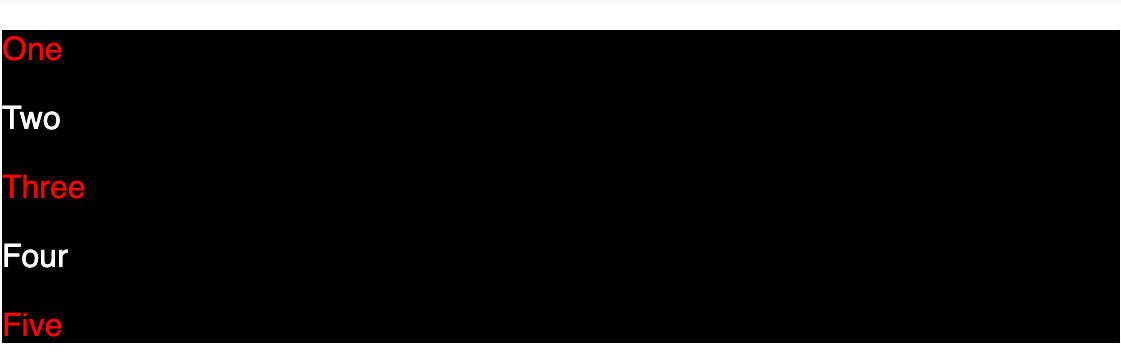


{"resource":{"author":{"id":"h2so9H8jPMmgUKGghoNl","name":"Yomesh Gupta","username":"yomeshgupta"},"content":{"link":null,"difficulty":1,"domain":2,"type":1,"isInternal":true,"body":"The `:nth-child()` CSS pseudo-class matches elements based on their position among a group of siblings i.e. let us say a div has five children where 3 are `p` tags and 2 are `span` tags. If we write the following HTML and CSS --\r\n\r\n```html\r\n<div>\r\n  <p>One</p>\r\n  <span>Two</span>\r\n  <p>Three</p>\r\n  <p>Four</p>\r\n  <span>Five</span>\r\n</div>\r\n```\r\n\r\n```css\r\ndiv {\r\n  background: black;\r\n  color: white;\r\n}\r\n\r\ndiv p:nth-child(2n+1) {\r\n  color: red;\r\n}\r\n```\r\n\r\nIt highlights `One` and `Three` only. \r\n\r\n![Output 1](https://ik.imagekit.io/devtoolstech/blog/nth-child/Screenshot_2023-02-17_at_11.55.38_PM_bguuSDkek.png?ik-sdk-version=javascript-1.4.3&updatedAt=1676659138066)\r\n\r\n## Now, why is that?\r\n\r\nFor this, you need to mainly understand the functional notation syntax of the `:nth-child` selector i.e. `:nth-child(An+B)`. Here\r\n\r\n- `A` is the step size\r\n- `B` is the offset\r\n- `n` is the non-negative integer, starting from `0`.\r\n\r\nIn our example, `:nth-child(2n+1)` where `A=2`, `B=1`, and `n can go from 0,1,2..` to `Infinity`.\r\n\r\n```\r\n:nth-child(2(0)+1) => :nth-child(0 + 1) => :nth-child(1)\r\n:nth-child(2(1)+1) => :nth-child(2 + 1) => :nth-child(3)\r\n:nth-child(2(2)+1) => :nth-child(4 + 1) => :nth-child(5)\r\n...\r\n```\r\n\r\n## Element Indexing\r\n\r\nIn our CS classes or our dev work, we are used to having 0-based indices. However, in the case of counting the elements, 1-based indexing is used i.e.\r\n\r\n```html\r\n<div>\r\n  <p>One</p> // 1\r\n  <span>Two</span> // 2\r\n  <p>Three</p> // 3\r\n  <p>Four</p> // 4\r\n  <span>Five</span> // 5\r\n</div>\r\n```\r\n\r\n**The `n` starts from `0` but elements counting starts from `1`.** Hence, it matches element `One` and `Three`.\r\n\r\n## Why is Five not highlighted in red?\r\n\r\nFor `:nth-child` selector, the child count includes children of any element type; but it is considered a match only if the element at that child position is of the specified element type. Hence, even though `:nth-child(2n+1)` produces `5` when `n=2` and we have a fifth element, it is highlighted because it is of type `span`. Our condition to match the element must be at the right position and right type.\r\n\r\nIf we change the fifth element to type `p` then it would be highlighted.\r\n\r\n```html\r\n<div>\r\n  <p>One</p> // 1\r\n  <span>Two</span> // 2\r\n  <p>Three</p> // 3\r\n  <p>Four</p> // 4\r\n  <p>Five</p> // 5\r\n</div>\r\n```\r\n\r\n![Output 2](https://ik.imagekit.io/devtoolstech/blog/nth-child/Screenshot_2023-02-17_at_11.55.52_PM_99EUwTpyA.png?ik-sdk-version=javascript-1.4.3&updatedAt=1676659220767)\r\n\r\n## Learn by examples\r\n","languages":["react"],"editorConfig":{"react":{"nodes":[{"nodeId":"4aad7d47-c5b9-4d0c-9b0c-c0a4340e87ec","nodeType":"file","nodeName":"App.js","nodeContent":"import styled from 'styled-components';\n\nconst Container = styled.div`\n  &:hover {\n    ul[data-key='${(props) => props.label}'] > ${(props) => props.label} {\n      background-color: yellow;\n    }\n\n    p {\n      display: block;\n    }\n  }\n`;\n\nconst items = [\n  {\n    id: 1,\n    label: ':first-child',\n    description: 'Highlighting the first child.',\n  },\n  {\n    id: 2,\n    label: ':last-child',\n    description: 'Highlighting the last child.',\n  },\n  {\n    id: 3,\n    label: ':nth-child(2)',\n    description: 'Highlighting the second child.',\n  },\n  {\n    id: 4,\n    label: ':nth-last-child(2)',\n    description: 'Highlighting the second child from the last.',\n  },\n  {\n    id: 5,\n    label: ':nth-child(odd)',\n    description:\n      'Highlighting the every odd child i.e. 1,3,5,7,9....and so on.',\n  },\n  {\n    id: 6,\n    label: ':nth-child(even)',\n    description:\n      'Highlighting the every odd child i.e. 2,4,6,8,10....and so on.',\n  },\n  {\n    id: 7,\n    label: ':nth-child(n+4)',\n    description:\n      'Highlighting the every child starting from 4 i.e. 4,5,6,7....and so on.',\n  },\n  {\n    id: 8,\n    label: ':nth-child(3n-1)',\n    description:\n      'Highlighting the every matching the condition i.e. (3(1) - 1) = 2, (3(2) - 1) = 5',\n  },\n  {\n    id: 9,\n    label: ':nth-child(3n+1)',\n    description:\n      'Highlighting the every matching the condition i.e. (3(0) + 1) = 1, (3(1) + 1) = 4, (3(2) + 1) = 7',\n  },\n  {\n    id: 10,\n    label: ':nth-child(4n)',\n    description:\n      'Highlighting the every matching the condition i.e. (4(1)) = 4',\n  },\n];\n\nexport default function App() {\n  return (\n    <main>\n      {items.map((item) => {\n        return (\n          <Container label={item.label} key={item.id} className=\"content\">\n            <div>\n              <span>{item.label}</span>\n              <ul data-key={item.label}>\n                <li></li>\n                <li></li>\n                <li></li>\n                <li></li>\n                <li></li>\n                <li></li>\n              </ul>\n            </div>\n            {item.description ? <p>{item.description}</p> : null}\n          </Container>\n        );\n      })}\n    </main>\n  );\n}\n","nodeLanguage":"javascript"},{"nodeId":"f7578692-c62f-4c69-8c17-4876fd36eff1","nodeType":"file","nodeName":"index.js","nodeContent":"import { StrictMode } from \"react\";\nimport ReactDOM from \"react-dom\";\n\nimport App from \"./App\";\nimport \"./style.css\"; \n\nconst rootElement = document.getElementById(\"root\");\nReactDOM.render(\n  <StrictMode>\n    <App />\n  </StrictMode>,\nrootElement\n);","nodeLanguage":"javascript"},{"nodeId":"3f480fbb-5d4a-4a3a-9e30-80af7d530e96","nodeType":"file","nodeName":"style.css","nodeContent":"* {\n  box-sizing: border-box;\n  margin: 0;\n  padding: 0;\n}\n\nbody {\n  font-family: sans-serif;\n  -webkit-font-smoothing: auto;\n  -moz-font-smoothing: auto;\n  -moz-osx-font-smoothing: grayscale;\n  font-smoothing: auto;\n  text-rendering: optimizeLegibility;\n  font-smooth: always;\n  -webkit-tap-highlight-color: transparent;\n  -webkit-touch-callout: none;\n  background: #2f3542;\n}\n\nmain {\n  width: 80%;\n  margin: 50px auto;\n  padding: 20px;\n  display: flex;\n  flex-direction: column;\n  justify-content: center;\n  align-items: center;\n  border: 1px solid #ecf0f1;\n  transition: all 0.2s ease-in-out;\n  color: white;\n}\n\n.content {\n  width: 100%;\n  padding: 10px;\n  border-radius: 4px;\n  transition: all 0.2s ease-in-out;\n  cursor: pointer;\n}\n\n.content div {\n  display: flex;\n  justify-content: space-between;\n}\n\n.content div span {\n  font-weight: 600;\n}\n\n.content p {\n  padding: 10px 0px 0px 0px;\n  color: #ebebeb;\n  font-size: 14px;\n  display: none;\n}\n\n.content ul {\n  display: flex;\n  justify-content: space-between;\n  gap: 20px;\n}\n\n.content ul li {\n  width: 20px;\n  height: 20px;\n  border-radius: 50%;\n  background-color: rgba(255, 255, 255, 0.7);\n  list-style: none;\n}\n\n.content:hover {\n  background-color: #000000;\n}\n","nodeLanguage":"css"},{"nodeId":"93f9d0ad-b85e-483e-91cb-0b8d4c8353c4","nodeType":"file","nodeName":"index.html","nodeContent":"<!DOCTYPE html>\n<html lang=\"en\">\n  <head>\n    <meta charset=\"UTF-8\">\n    <meta name=\"viewport\" content=\"width=device-width, initial-scale=1.0\">\n    <title>Document</title>\n  </head>\n  <body>\n    <div id=\"root\"></div>\n  </body>\n</html>","nodeLanguage":"html"}],"dependencies":{"react":"17.0.2","react-dom":"17.0.2","react-scripts":"4.0.0","styled-components":"5.3.6"},"openPaths":["/App.js","/index.js","/index.html","/style.css"],"entry":"App.js","activePath":"/style.css"}}},"stats":{"views":12295,"used":0,"likes":0},"description":"","published":true,"isActive":true,"tags":["javascript","frontend","code","programming","ui","ux","interactive examples","codedamn","nth-child selectors","pseudo selectors","css selectors","sass","scss","less","styling","html","css fundamentals","frontend fundamentals","examples","codesandbox"],"slug":"understanding-nth-child-selectors-in-css---rid---ZD7WRQQ8iSNv8SCSZdTG","isPremium":false,"categories":[],"requires":[],"_id":"63f077e9412456738aaee88c","title":"Understanding Nth-Child Selectors in CSS","resourceId":"ZD7WRQQ8iSNv8SCSZdTG","createdAt":1676703721912,"modifiedAt":1676704374212},"currentUser":null,"isOwner":false,"recommendations":{"questions":[{"_id":"635158729efd8c366a2e803e","content":{"languages":["javascript","typescript"],"difficulty":1},"tags":["","javascript","arrays","javascript polyfills","interview question","frontend","coding","devtools tech","programming","codedamn","frontend masters","egghead","razorpay","hotstar","tata1mg","swiggy","zomato","array","array findLast"],"slug":"how-to-implement-array-prototype-findlast-javascript-interview-question-or-problem-solving-or-javascript-polyfills---qid---4elHQSt4lhIUF1t0RVa3","title":"How to implement Array.prototype.findLast? JavaScript Interview Question | Problem Solving | JavaScript Polyfills","questionId":"4elHQSt4lhIUF1t0RVa3"},{"_id":"67cc043127b2785b41f18eb0","content":{"languages":["react","html"],"difficulty":2},"tags":["javascript","ui","ux","interview","drag and drop","questions","interview questions","frontend interview"],"slug":"how-to-create-a-drag-and-drop-list-component---qid---C5yqJ5JJaTUY6en6Bs1R","title":"How to create a Drag and Drop List Component?","questionId":"C5yqJ5JJaTUY6en6Bs1R"},{"_id":"60ce47a8e541233080dcd5c5","content":{"languages":["react"],"difficulty":4},"tags":["javascript","react","react hooks","frontend","javascript fundamentals","interview questions","frontend fundamentals"],"slug":"how-to-build-a-custom-timer-hook-in-react-js-or-usetimer-or-javascript-interview-question---qid---H5KlkIeowa1LrIn1mSN5","title":"How to build a custom timer hook in React.js? | useTimer | JavaScript Interview Question","questionId":"H5KlkIeowa1LrIn1mSN5"},{"_id":"698335e0895fc3bf013c3ff5","content":{"languages":["html"],"difficulty":2},"tags":["javascript","ui","ux","devtools tech","coding","frontend interview","challenges","microsoft interview question"],"slug":"search-page-with-highlighting---qid---J4OIHWaR6t0sOnCyk2ib","title":"Search Page with Highlighting","questionId":"J4OIHWaR6t0sOnCyk2ib"},{"_id":"642be8c76577005718b848a8","content":{"languages":["html","react"],"difficulty":1},"tags":["frontend","ui","ux","progress bars","uber","frontend interview question","reactjs","devtools tech","system design","frontend masters","coding","javascript","advanced javascript"],"slug":"how-to-animate-multiple-progress-bars-in-a-sequence-or-uber-frontend-interview-question-or-react-js-or-javascript-or-html-or-css---qid---0pJDOORWvcix4ymghsB9","title":"How to animate multiple progress bars in a sequence? | Uber Frontend Interview Question | React.js | JavaScript | HTML | CSS","questionId":"0pJDOORWvcix4ymghsB9"}],"resources":[{"_id":"632544a5ff34d52bbb0796d5","content":{"difficulty":1,"domain":2,"type":2,"isInternal":false},"tags":["javascript","frontend","js","advanced javascript","localstorage","browser","web storage","cookies","session storage","ui","tutorial","youtube"],"slug":"how-to-design-and-implement-localstorage-api-or-frontend-data-structures-or-javascript-interview-questions---rid---kh86UNH6qMxBEaWBcTgr","title":"How to design and implement LocalStorage API | Frontend Data Structures | JavaScript Interview Questions","resourceId":"kh86UNH6qMxBEaWBcTgr"},{"_id":"696a34bc132ce4e954b82594","content":{"difficulty":4,"domain":2,"type":1,"isInternal":true,"languages":[]},"tags":["javascript","ui","ux","devtools tech","coding"],"slug":"uber-frontend-interview-experience-sde-2---rid---dCWHwzvBTfbpsf7QzzqX","title":"Uber Frontend Interview Experience (SDE-2)","resourceId":"dCWHwzvBTfbpsf7QzzqX"},{"_id":"696d0bb4132ce4e954b9835b","content":{"difficulty":4,"domain":2,"type":1,"isInternal":true,"languages":[]},"tags":["javascript","ui","ux","devtools tech","tutorials","blogs","react","internationalisation","internationalization","write up"],"slug":"internationalization-i18n-in-react---rid---AwsQRhptlqw0QvQDPhCd","title":"Internationalization (i18n) in React","resourceId":"AwsQRhptlqw0QvQDPhCd"},{"_id":"652d65f9d5ab2876a4ca215c","content":{"difficulty":4,"domain":2,"type":1,"isInternal":false,"languages":["undefined"]},"tags":["frontend","coding","interview","tooling","web tools","ui","ux","atlan","devtools tech"],"slug":"atlan-interview-experience-frontend-engineer-intern---rid---v5soIECQ4OQQ9S1FFR7n","title":"Atlan Interview Experience: Frontend Engineer Intern","resourceId":"v5soIECQ4OQQ9S1FFR7n"},{"_id":"697b25a8132ce4e954d59b37","content":{"difficulty":1,"domain":2,"type":1,"isInternal":true,"languages":[]},"tags":[""],"slug":"rippling-frontend-interview-experience---rid---n4yp5bZBiParUibIGjEe","title":"Rippling Frontend Interview Experience","resourceId":"n4yp5bZBiParUibIGjEe"}]}}