



This blog post is part of a series in which we are going to build a minimal, simple and yet powerful version of Express.js, called Minimal.js. This is the second part. You can check out part 1 here.
We are learning on the go so if you find any mistake or any better way to do certain things or just want to share your feedback then I am all ears and open to collaboration. Let me know your opinions here.
In part 1, we talked about HTTP, explored a couple of Node.js modules and built a simple server using native modules.
Part 2
This part would revolve around shaping our framework, exposing APIs and talking about middlewares. Complete code for this part can be found here.
I would recommend that you should code along. So, go ahead, clone the repo and check out the part-1 branch. Create a new branch part-2 from part-1.
git clone https://github.com/yomeshgupta/minimaljs.git
git checkout part-1
git checkout -b part-2 part-1
Now, create a folder src and inside that folder create two files, index.js and minimal.js.
mkdir src
cd ./src
touch index.js
touch minimal.js
Shaping our framework
In Express, we require the module in our file and it exposes methods like listen, use, get, post and likes.
const express = require("express");
const app = express();

app.use("/path", (req, res) => {});
app.get("/path", (req, res) => {});

app.listen(8080, () => console.log("Server running"));
We are going to create a similar structure. Now, inside our minimal.js, we are going to create a function that will act as an entry point to our framework.
function Minimal() {
  return {};
}

module.exports = Minimal;
Adding methods
First, we are going to implement the listen method which will take port and callback as arguments and returns an http.Server instance.
const http = require('http');

function Minimal() {
  function listen(port = 8080, cb) {
    return http
      .createServer((req, res) => {})
      .listen({ port }, cb);
  }

  return {
    listen
  };
}
...
Let's move our requestListener implementation from part-1 into our newly created listen method along with some listen method validations.
...
const fs = require('fs');
const path = require('path');

function Minimal() {
  function listen(port = 8080, cb) {
    return http
      .createServer((req, res) => {
        fs.readFile(path.resolve(__dirname, 'public', 'index.html'), (err, data) => {
          res.setHeader('Content-Type', 'text/html');
          if (err) {
            res.writeHead(500);
            return res.end('Some error occured');
          }
          res.writeHead(200);
          return res.end(data);
        });
      })
      .listen({ port }, () => {
        if (cb) {
          if (typeof cb === 'function') {
            return cb();
          }
          throw new Error('Listen callback needs to be a function');
        }
      });
  }
  ...
}
...
You can make changes to server.js and take this for a spin!
const minimal = require("./src/minimal");
const CONFIG = require("./config");

const app = minimal();
const server = app.listen(CONFIG.PORT, () =>
  console.log(`Server running on ${CONFIG.PORT}`)
);
Extending Request
Express provides us with additional data on the request object. We can access properties like req.pathname, req.path, req.queryParams directly from our request object. We are going to write a simple utility function that will extend our request object.
Now, create a new file request.js in the src folder
cd ./src
touch request.js
We are going to parse the incoming request using the Node.js in-build url module and add properties to our request object.
const url = require("url");

function request(req) {
  const parsedUrl = url.parse(`${req.headers.host}${req.url}`, true);
  const keys = Object.keys(parsedUrl);
  keys.forEach((key) => (req[key] = parsedUrl[key]));
}

module.exports = request;
Extending Response
Just like we did for the request object, we are going extend the response object and add methods like send, json, redirect.
touch response.js
Add the following code to the file
function response(res) {
  function end(content) {
    res.setHeader("Content-Length", content.length);
    res.status();
    res.end(content);
    return res;
  }

  res.status = (code) => {
    res.statusCode = code || res.statusCode;
    return res;
  };

  res.send = (content) => {
    res.setHeader("Content-Type", "text/html");
    return end(content);
  };

  res.json = (content) => {
    try {
      content = JSON.stringify(content);
    } catch (err) {
      throw err;
    }
    res.setHeader("Content-Type", "application/json");
    return end(content);
  };

  res.redirect = (url) => {
    res.setHeader("Location", url);
    res.status(301);
    res.end();
    return res;
  };
}

module.exports = response;
Updating our framework
Now, let's update our framework and use the functionalities we just created. In minimal.js, make the following changes
...
const request = require('./request');
const response = require('./response');

function Minimal() {
  ...
    function listen(port = 8080, cb) {
    return http
      .createServer((req, res) => {
        request(req);
        response(res);
        fs.readFile(path.resolve(__dirname, '../', 'public', 'index.html'), (err, data) => {
          if (err) {
            return res.status(500).send('Error Occured');
          }
          return res.status(200).send(data);
        });
    ...
  }
}
Middlewares
Let's first see what Express docs say about them
Middleware functions are functions that have access to the request object (req), the response object (res), and the next middleware function in the application’s request-response cycle. The next middleware function is commonly denoted by a variable named next.
So, when we request a server then it takes in the request and returns a response. During this cycle, multiple functions can transform the request or response object, execute some code, end the request altogether or simply pass on the request to the next function in the array. These functions which execute during the request-response lifecycle are called Middlewares.
Usage
All APIs exposed by Express i.e. use, post, put, get and others are based on a middleware system. However, in this series, we are going to focus on the use method. Middlewares can be global or bound to a path.
const app = express();

// Function will execute every time the app receives a request
app.use((req, res) => {
  /* some processing */
});

// Function will execute only when a request is made to path /about
app.use("/about", (req, res) => {
  /* some processing */
});
Time to make changes to our minimal.js to accommodate this functionality.
...
function Minimal() {
  const _middlewares = [];

  function use(...args) {
    let path = '*';
    let handler = null;

    if (args.length === 2) [path, handler] = args;
    else handler = args[0];

    if (typeof path !== 'string') throw new Error('Path needs to be a string');
    else if (typeof handler !== 'function') throw new Error('Middleware needs to be a function');

    _middlewares.push({
      path,
      handler
    });
  }
  ...
  return {
    use,
    listen
  }
}
In the above code snippet:
- We are exposing a new method
use, which primarily takes two parameters --pathand itshandler. - We created an array called
\_middlewareswhich will be an array of objects where each object contain a path and its handler. So, whenever an instance of our app invokes theusemethod then arguments provided will be pushed into our middleware array. - We added some validations that our
pathneeds to be a string andhandlerneeds to be a function only. - We are currently not supporting regex in
path.
Middleware Handling
So far, we have extended our request, response and added the use method to our framework. Now, when the method is invoked and middleware is pushed to our array then we need to handle it as in executing the function on all matching paths. Unlike, our life problems from which we run away, this one we need to handle.
Let's start by refactoring our use method a bit. We will extract the path and handler determination logic and move it to a helper file.
cd ./src
mkdir lib
cd ./lib
touch helpers.js
Add the following code to the helpers.js file
function checkMiddlewareInputs(args) {
  let path = "*";
  let handler = null;

  if (args.length === 2) [path, handler] = args;
  else handler = args[0];

  if (typeof path !== "string")
    throw new Error("Path needs to be either a string");
  else if (typeof handler !== "function")
    throw new Error("Middleware needs to be a function");

  return {
    path,
    handler,
  };
}

module.exports = { checkMiddlewareInputs };
Using this in our minimal.js
...
const { checkMiddlewareInputs } = require('./lib/helpers');

function Minimal() {
  ...
  function use(...args) {
    const { path, handler } = checkMiddlewareInputs(args);
    _middlewares.push({
      path,
      handler
    });
  }
  ...
}
We need to modify our listen method because as we have seen earlier all requests go through the requestListener function handler which we provide to createServer. We are going to create a handle method that would be responsible for executing all our middlewares sequentially on each request.
...
  function handle(req, res) {
    /* Will do middleware handling here*/
  }
  function listen(port = 8080, cb) {
    return http
      .createServer((req, res) => {
        request(req);
        response(res);
        handle(req, res);
      })
    ...
  }
...
Execution Handling
Every middleware takes 3 arguments: request object, response object and the next function. Consider, next here as a way of telling the framework that current execution is over and you can move on to the next middleware in the array. If a middleware doesn't call the next then our request-response cycle will be stuck. So, middleware must call next!
From our array of middlewares, we are going to find the next middleware and execute it. To do so, we are going to modify the handle method and going to add the findNext method which is responsible for returning the next function.
...
const { matchPath } = require('./lib/helpers');

...
function findNext(req, res) {
  let current = -1;
  const next = () => {
    current += 1;
    const middleware = _middlewares[current];
    const { matched = false, params = {} } = middleware ? matchPath(middleware.path, req.pathname) : {};

    if (matched) {
      req.params = params;
      middleware.handler(req, res, next);
    } else if (current <= _middlewares.length) {
      next();
    }
  };
  return next;
}

function handle(req, res) {
  const next = findNext(req, res);
  next();
}
...
Breaking the above code snippet step by step
-
Our
findNextmethod returns a function callednextwhich tracks the current middleware as in the one which is going to be executed, by maintaining the counter which updates on every call.- Initially, the current will be -1 and on the first
nextcall, it will be updated to 0 and then the first middleware in the array will be returned and so on. - Returned value can be a middleware or undefined (If the array is empty or we just executed the last element in the array).
- Then we match the path provided at the time of
useinvocation to the current request path. If matched then execute else move on.
- Initially, the current will be -1 and on the first
-
matchPathis a utility function in ourhelpers.js. Add the following code to the helper.js.
...
function matchPath(setupPath, currentPath) {
  const setupPathArray = setupPath.split('/');
  const currentPathArray = currentPath.split('/');
  const setupArrayLength = setupPathArray.length;

  let match = true;
  let params = {};

  for (let i = 0; i < setupArrayLength; i++) {
    var route = setupPathArray[i];
    var path = currentPathArray[i];
    if (route[0] === ':') {
      params[route.substr(1)] = path;
    } else if (route === '*') {
      break;
    } else if (route !== path) {
      match = false;
      break;
    }
  }

  return match ? { matched: true, params } : { matched: false };
}

module.exports = { checkMiddlewareInputs, matchPath };
It split the paths provided at the time of middleware setup and current request handling into arrays. Each ith element of both arrays is matched to determine if both paths are the same. However, we make two exceptions here:
- If we encounter the
:character at the start of the array element then we consider it as aparamand add it to ourparamsobject. This is done so to accommodate paths like
app.use("/user/:userId", () => {});
- If the array element is
*character then we break the loop because it will be a catch-all route.
app.use("/*", () => {});
Now, after the processing, we return an object which may contain two properties, matched and params. We add the params to the request object so that any middleware handler can use those params.
Testing
Let's test out what we have built so far. We will install an npm package that allows making CORS requests.
npm i cors --save
Then replace the contents of server.js with the following
const cors = require("cors");
const fs = require("fs");
const path = require("path");

const minimal = require("./src/minimal");
const CONFIG = require("./config");

const app = minimal();

app.use("/about", cors());
app.use("/about", (req, res, next) => {
  res.send("I am the about page");
  next();
});

app.use("/", (req, res, next) => {
  fs.readFile(path.resolve(__dirname, "public", "index.html"), (err, data) => {
    if (err) {
      res.status(500).send("Error Occured");
      return next();
    }
    res.status(200).send(data);
    return next();
  });
});

const server = app.listen(CONFIG.PORT, () =>
  console.log(`Server running on ${CONFIG.PORT}`)
);
Now, run the server
npm run start
If you visit the http://localhost:8080 then you will see our good old HTML as before. However, if you visit http://localhost:8080/about and open the devtools (no pun intended :P) then you will see a new response header Access-Control-Allow-Origin: \* which is set by our CORS package.
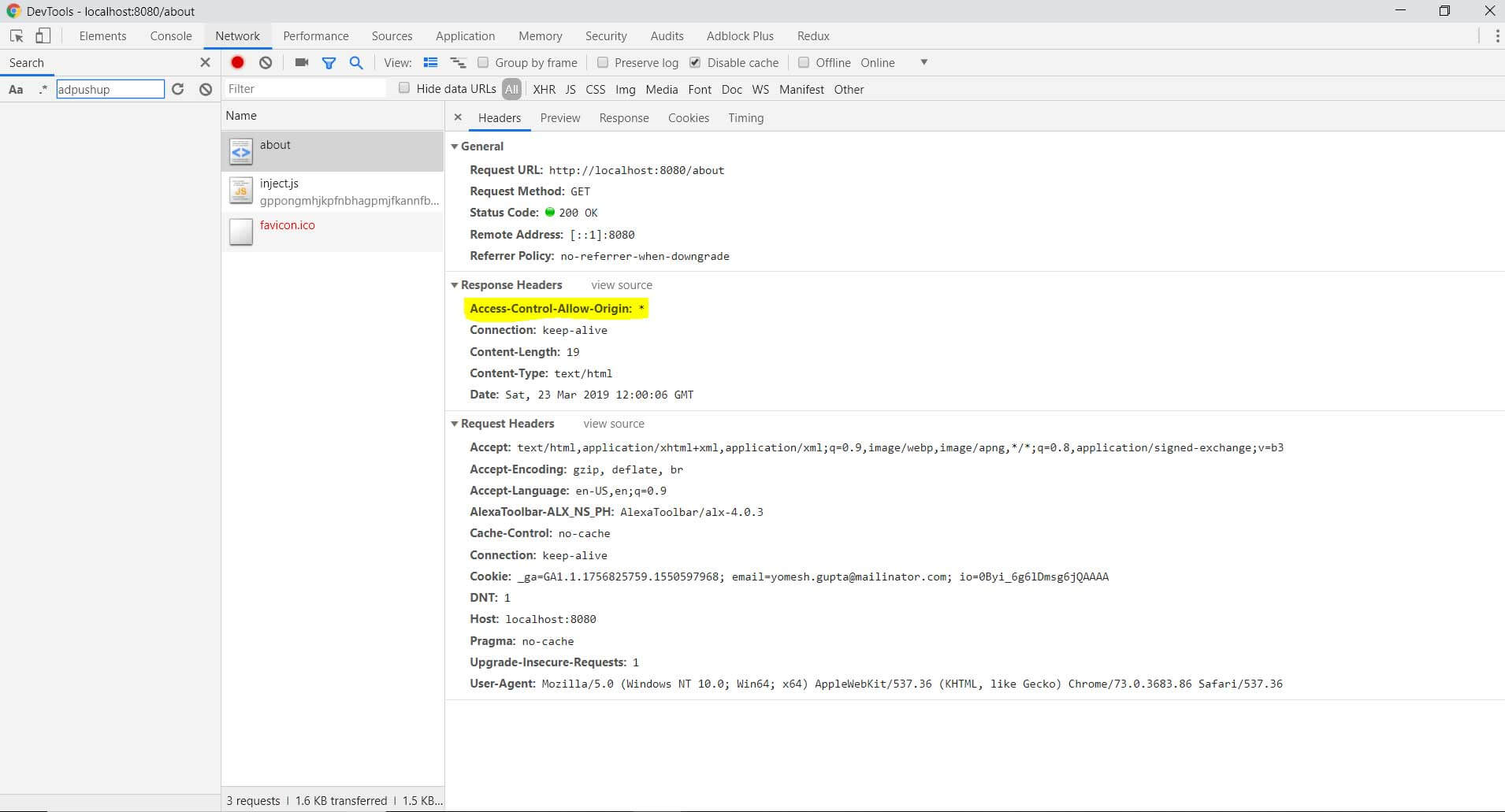
Yayy!! Our framework is working!! :P In the next part, we are going to talk about Routing. Stay tuned!
Complete code for this part can be found here.